


What marketers need to know before launching their first conversational-AI ad campaign
Advertising is moving into conversational AI, and ChatGPT is one of the first major platforms to bring it to life. If you’re considering ChatGPT as a new channel, the mental model is closer to search advertising than social or display — but with a few important twists that come from how people actually talk to an AI assistant.
To make this concrete, we’ll follow a single example throughout this guide: Zigma.ca advertising its own AI ad management services on ChatGPT — a fitting example, since that’s exactly the kind of campaign this guide is meant to help you run. Every example, ad, and number below is built around that one campaign so you can see how the pieces fit together end to end.
Why ChatGPT Ads Are Different
On Google, you’re matching to keywords. On ChatGPT, you’re matching to intent — the fuller, more conversational way someone describes what they’re trying to do. That richer context means your ad copy itself becomes one of the biggest levers you have, arguably as important as keyword selection is on traditional search.
| Platform | How the user phrases the need |
| Traditional search | “digital marketing agency AI ads” |
| ChatGPT | “What’s a good agency to help me run ChatGPT ad campaigns? I don’t really know where to start.” |
Same need, very different phrasing — and very different signal to match against.
Ads currently show up underneath relevant conversations to free-tier and lower-cost subscription users, not to users on premium plans. Because the assistant has already gathered context from the conversation — the platform, the budget, the level of experience — a well-written ad can speak directly to that context instead of guessing from three keywords.
Anatomy of a ChatGPT Ad
Here’s what that looks like in practice when Zigma.ca’s ad gets matched to the question above:
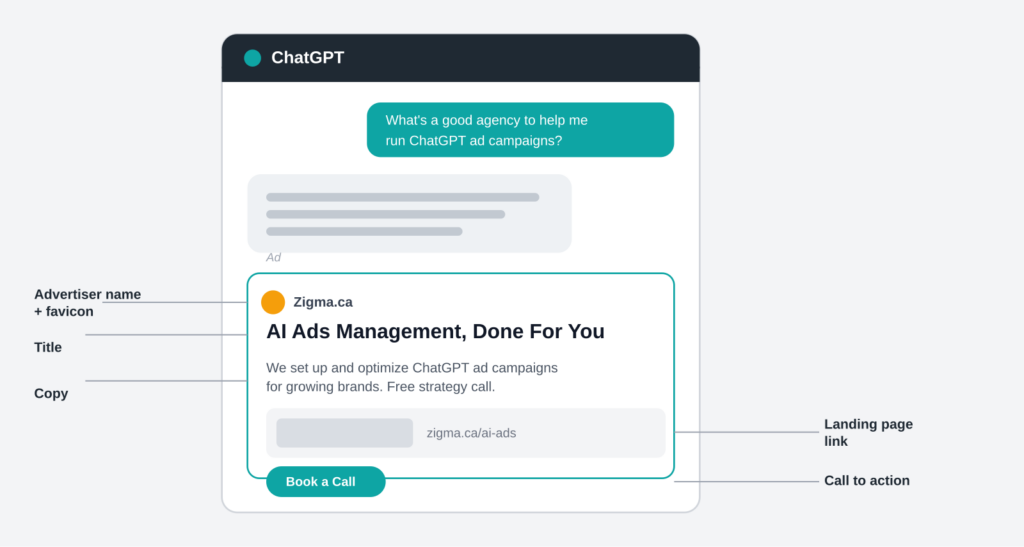

Every ad unit includes an advertiser name and favicon, a title, copy, a landing page, and usually an image.
Relevance is driven mostly by the title, copy, and landing page — keywords play a smaller, secondary role compared to how heavily they’re weighted on legacy search platforms. That’s a meaningful shift in where you should spend your optimization time.
Campaign Structure: Campaign → Ad Group → Ad
If you’ve run search or social campaigns before, this three-level hierarchy will feel familiar:
- Campaigns set the overall goal and budget.
- Ad groups break that goal into themes, use cases, or audience segments, and carry the keywords used for matching.
- Ads are the actual creative — and you’ll want several per ad group, each taking a different angle on the same offer.
Here’s how Zigma.ca might structure its first campaign promoting its own AI ads management service:
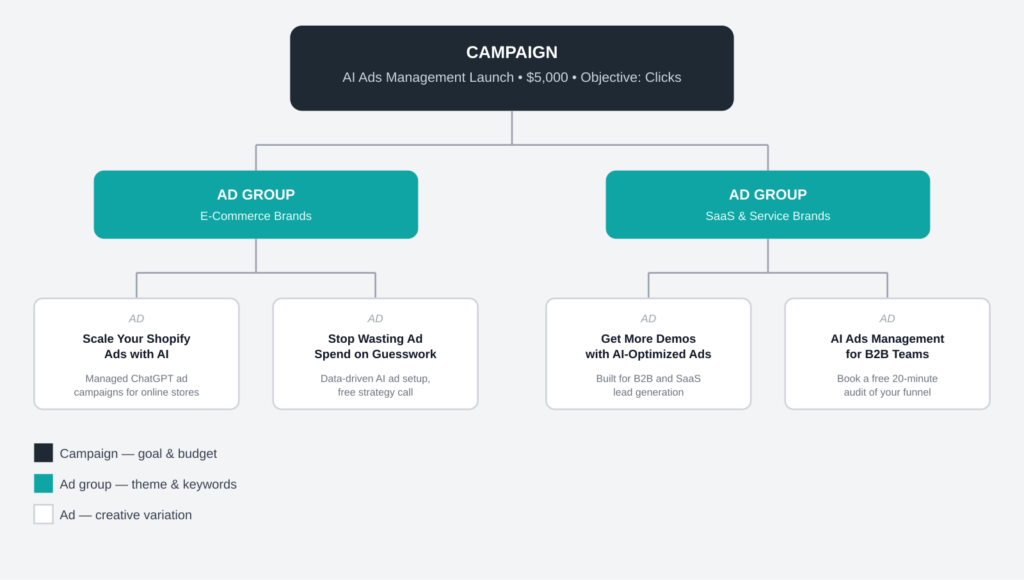

One campaign, two ad groups by client type, two ad variations in each — a reasonable starting structure for a first launch.
Notice that the two ad groups don’t just split by service tier — they split by who the client is and what they’re trying to do (an e-commerce store wanting more sales vs. a SaaS team wanting more demos). That’s a more useful split on a conversational platform than splitting by product feature, because it mirrors how people actually describe their situation.
Writing Ads That Actually Perform
A few best practices stand out across the board, whether you’re writing the title, the copy, the landing page, or the image.
Titles
- Lead with the value, not the brand. What does the user get?
- Be specific rather than generic — vague marketing language gets lost.
- Stay within the character limit and make every word count.
Copy
- Don’t just repeat the title — add new information.
- Expand on the benefit, feature, or use case.
- Keep it consistent with what the user will actually see on the landing page.
Landing Pages
- Send people to the most relevant page (a product or category page), not your homepage.
- Keep the message consistent from ad to click to page.
- Use UTM or other tracking parameters so you can measure what’s working.
Images
- Keep them simple, product-forward, and aligned with the ad’s message.
- Avoid clutter or overly abstract visuals — clarity beats art direction here.
Weak vs. Strong: A Side-by-Side Example
It’s easy to describe “generic” and “specific” in the abstract. Here’s what the difference actually looks like for the same service:
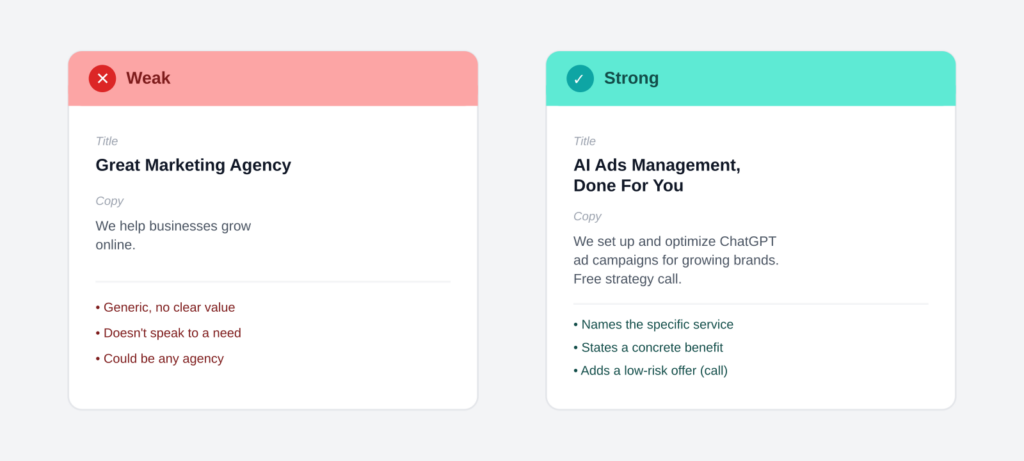

The strong version doesn’t just sound better — it answers a specific question the user already asked.
Notice that the weak version isn’t badly written. It’s just generic enough to describe almost any marketing agency, which means it has nothing in particular to match against when the system is deciding which ad is most relevant to a given conversation.
Build Volume and Variety, Not Just One Great Ad
One of the clearest patterns in early advertiser performance is that a bigger, more varied creative library tends to unlock more delivery and better ranking. Because conversational queries come at the same need from so many different directions, a single “best” ad won’t cover nearly as much ground as it might on a keyword-matched platform.
A simple way to scale your creative library:
- Start with a small set of strong, on-brand ads covering your core products, use cases, and audiences.
- Use AI to expand that set. Feed your best-performing ads into a model and ask it to generate variations that change one structural element at a time.
- Review and refresh regularly, retiring weaker ads and replacing them with new variants rather than minor rewrites of the same line.
Here’s what that expansion actually looks like, taking the “strong” Zigma.ca ad from above and pulling five genuinely different angles out of it:
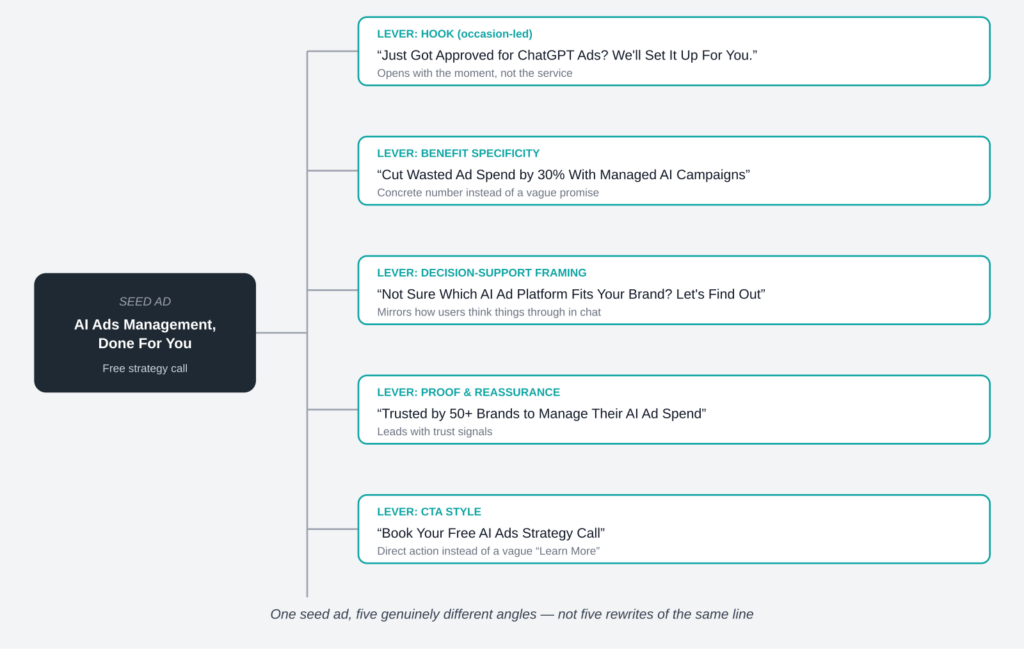

Same service, same offer, five different reasons for the system to match it to five different conversations.
A good test for whether your variants are different enough: could someone swap the brand name on two of your ads and not notice? If yes, they’re too similar. Each version above would fail that test — the hook, the proof point, and the call to action are all doing different jobs.
Understanding the Bidding Models: CPM vs. CPC
Two buying models are showing up in this space:
| CPC | CPM | |
| You pay for | Clicks | Impressions (per 1,000) |
| Best for | Driving clicks, traffic, conversions | Reach and visibility |
| Optimized toward | High-intent users likely to click | Broad delivery at scale |
CPM (cost per thousand impressions) is the more established model — you’re charged based on a dynamic rate determined by an impression-based auction, regardless of whether anyone clicks.
CPC (cost per click) is the newer, performance-oriented model. You set a maximum bid for what you’re willing to pay per click, and you’re only charged when someone actually clicks. This tends to work well for advertisers focused on direct response: site visits, product exploration, or downstream conversions.
To see how differently the two models spend the same money, imagine Zigma.ca has a flat $1,000 monthly budget for its own campaign and has to choose one:
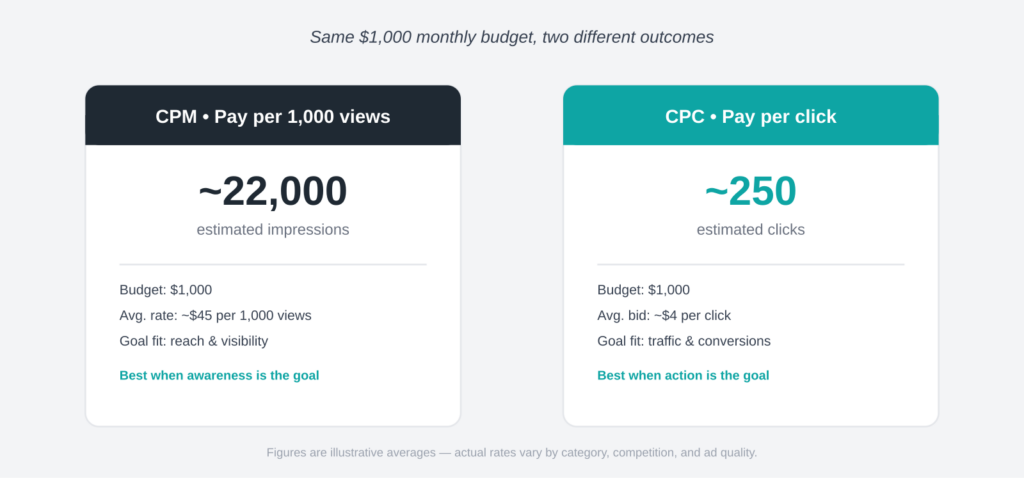

Same dollars, two very different shaped outcomes — reach vs. action.
Neither outcome is “better” in the abstract. If Zigma.ca is introducing its agency to a new audience and wants awareness, the 22,000 impressions matter more. If Zigma.ca wants prospects on the site booking strategy calls today, the 250 clicks are worth far more than the impressions that didn’t convert into a visit. A reasonable starting point for a CPC max bid is in the $3–5 range, refined over time based on performance.
How the Auction Works (At a High Level)
Both CPC and CPM campaigns typically compete in the same auction, which gets translated into a common “expected value” so neither buying model is structurally disadvantaged. In practice, that usually means your bid matters, but so does predicted engagement — and you generally pay only enough to beat the next-best competing ad, not your full maximum bid.
Here’s a simplified worked example with three advertisers bidding on the same placement, with Zigma.ca as one of them:
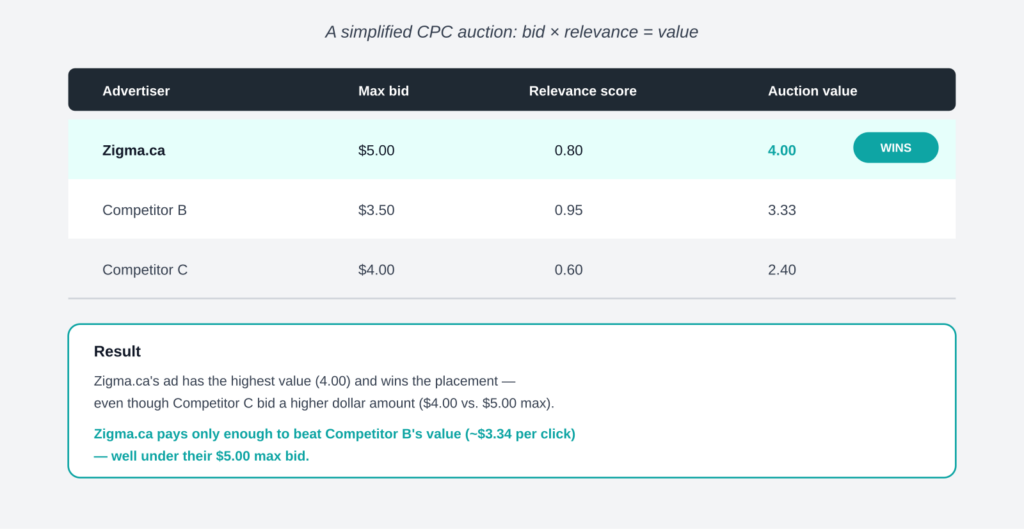

Relevance can beat a bigger bid — and the winner rarely pays their own maximum.
This is the same second-price logic used by Google and Meta: bid your true value rather than trying to guess the minimum that will win, because the system already protects you from overpaying.
Measuring What Matters
Reporting in this space typically starts simple — impressions, clicks, and spend — and expands from there as a platform matures (click-through rate, average CPC, and conversion-style metrics tend to follow as CPC buying rolls out).
To go beyond basic click tracking, advertisers generally have access to two complementary measurement tools:
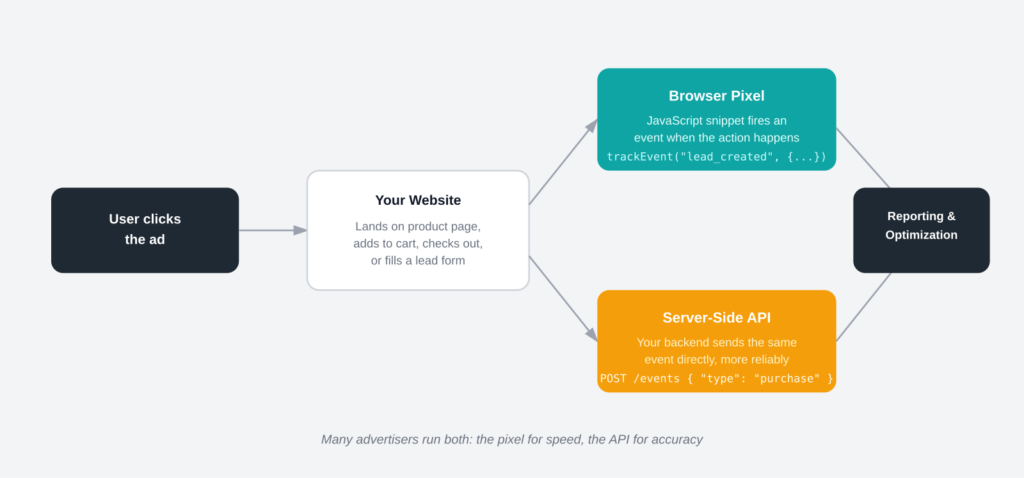
The pixel is fast to set up; the server-side API is more resilient to browser-level blockers.
- A client-side tracking pixel — a small JavaScript snippet installed on your site that fires an event (lead created, checkout started, item added, etc.) when a user takes a meaningful action after clicking through.
- A server-to-server conversions API — for sending the same kinds of standardized conversion events directly from your backend, useful when you want more reliable attribution than client-side tracking alone, or when privacy settings limit pixel visibility.
Worked example: when a prospect fills out Zigma.ca’s “book a strategy call” form, the pixel might fire a “lead_created” event from the browser in real time, while the backend sends the same lead — with the final, validated contact details — through the API a few seconds later. If the two ever disagree, the server-side number is the one to trust.
If conversion measurement matters for your campaigns, it’s worth setting up both early rather than retrofitting them after you’ve already spent meaningful budget.
Don’t Forget Crawler Access
Most ad platforms that validate landing pages run automated crawlers to check ad safety and relevance — and ChatGPT’s ecosystem is no exception. Before you launch, it’s worth doing a quick technical check with your engineering team.
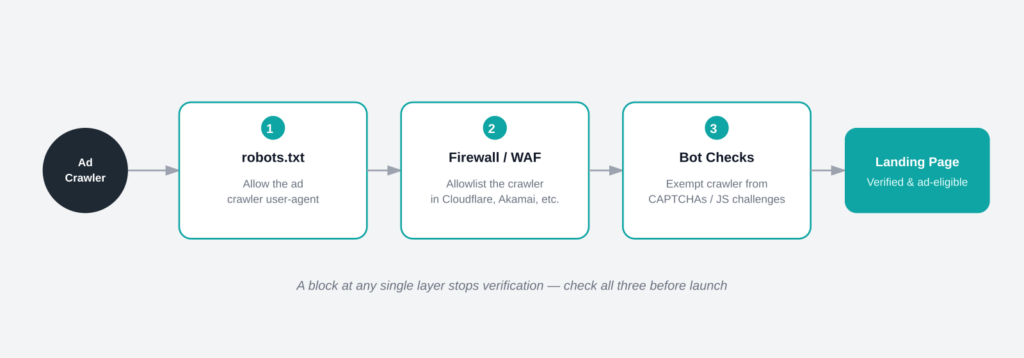

A block at any one of these three layers is enough to fail ad verification entirely.
- robots.txttxt: Make sure any relevant ads-related crawler user-agents are explicitly allowed, not just your general search crawler rules. A minimal example:
|
User-agent: * Allow: / |
- Bot mitigation / WAF tools (Cloudflare, Akamai, etc.): These can mistake legitimate ad-platform crawlers for malicious bots and block them with a 403. Allowlist known crawler user-agents where your provider supports it.
- Human-verification layers (CAPTCHAs, JS challenges): If your site has these, make sure automated ad-verification crawlers are exempted, or your landing pages may fail validation entirely.
- Rate limiting: If you’re uploading a large batch of ads with many distinct landing pages at once, spread it out — a sudden spike in crawler requests can trigger automated throttling on your end.
A landing page that silently blocks the verification crawler is one of the most common — and most avoidable — reasons ads fail to go live. If Zigma.ca’s “book a call” landing page sits behind a CAPTCHA meant for client logins, for instance, the ad attached to it may never get approved, with no obvious error pointing back to the real cause.
Putting It All Together: A Worked Mini-Launch
Stepping back, here’s how all of the pieces above would actually play out for Zigma.ca’s first month advertising its own AI ads management service:
|
Week 1 — Setup: Verify the account, confirm robots.txt and firewall rules allow the ad crawler, and install both the pixel and the conversions API on the “book a call” form. Week 1 — Structure: Launch one campaign (“AI Ads Management Launch,” $5,000, Clicks objective) with two ad groups split by client type. Week 1 — Creative: Start with 2 strong ads per ad group, then use the five-lever framework to expand to 8–10 ads per group within the first two weeks. Week 2–3 — Bidding: Start CPC bids at $4, watch the bid-strength indicator and CTR, and adjust up or down by $0.50 increments every few days. Week 4 — Review: Pull impressions, clicks, and spend by ad group, retire the bottom 20% of ads by CTR, and generate fresh variants to replace them. |
A Simple Launch Checklist
Before you hit submit on your first campaign:
- Business and billing info set up and verified
- Campaign objective chosen (clicks vs. views) and budget set
- Ad groups organized by theme, use case, or audience — each with a handful of distinct keywords
- At least 3–5 genuinely different ad variations per ad group (not just title swaps)
- Landing pages match ad messaging and load correctly
- Tracking parameters (UTMs) added to all destination URLs
- Crawler access confirmed — robots.txt, firewall, and bot-mitigation rules checked
- Pixel and/or conversions API installed if you plan to measure downstream actions
- Naming consistent across campaigns, ad groups, and ads (mismatched names are a common cause of bulk-upload errors)
The Bottom Line
Conversational ad platforms reward the same fundamentals as good search advertising — relevance, clarity, and a tight link between ad and landing page — but they put a heavier weight on creative volume and how well your copy mirrors the way people actually phrase their needs. Treat your ad copy as a living library, not a one-time setup task, build out both bidding models, and get your tracking infrastructure in place early. Advertisers who do all three tend to have a real head start as this channel matures.